Skip to content
SIWOMSPACE

Projects & research

What exists, what is a prototype, and what is planned.

Each project states its status, purpose, workflow, capabilities and intended users. We do not list customers, partnerships or deployments, because we have none to report yet.
Available
Usable today on this website, with the data and limits stated alongside it.
Prototype
Working software with known limitations. Not validated for operational use.
Research
Being investigated. Early methods may appear inside a prototype; no dedicated release yet.
Planned
On the roadmap. Design or scoping only; no working software yet.
01Mars · interactive, on this websiteAvailable

SIWOM Terrain Lab

A browser laboratory for terrain analysis on real Mars elevation data. Inspect western Jezero Crater in 3D, switch between surface, elevation, slope and hazard layers, and compute routes under a slope limit.

Purpose

Show, openly and reproducibly, how a planetary elevation model becomes terrain intelligence: what is measured, what is derived, and what a route planner can and cannot tell you.

Intended users

  • Students and educators in planetary science and robotics
  • Researchers comparing terrain-analysis methods
  • Engineers and prospective collaborators evaluating SIWOM's approach

Workflow

  1. 01Load a 100 m elevation grid derived from the USGS Mars 2020 CTX digital terrain model.
  2. 02Compute slope in the browser with Horn's method, using each row's true east–west cell size.
  3. 03Mark cells over a selectable slope limit as impassable and highlight the cells close to it.
  4. 04Pick a start and a goal on the terrain, or load a pair of recorded Perseverance stop positions.
  5. 05Run A* twice: a shortest route and a lower-slope route, both under the same slope limit.
  6. 06Compare length, climb, steepest and mean slope; read the elevation profile; export GeoJSON or CSV.

Capabilities

  • 3-D terrain and 2-D map views with hover readout of position, elevation and slopeAvailable
  • Surface (CTX orthoimage), elevation, slope and hazard layers with legends and sourcesAvailable
  • Shortest and lower-slope routes with computed statistics and an elevation profileAvailable
  • Perseverance traverse (sols 14–1980) and IAU place names as contextAvailable
  • GeoJSON route and CSV profile exportAvailable

Limitations

  • One region (about 30 × 30 km) at 100 m posts: boulders, scarps and ripples are averaged away.
  • Slope is the only constraint. It is not a safety model and must not be used for operational planning.
02Mars · standalone prototypePrototype

MOMAR — Planetary Terrain Intelligence

A browser-based planner that layers real NASA, ESA and USGS data over Mars so an explorer can ask three questions: where should I go, how do I get there with lower terrain risk, and what science lies on the way?

Purpose

Explore terrain-analysis methods and rover and EVA route-planning concepts on documented Mars datasets, with every layer labelled by source, resolution and status.

Developed as a prototype for the 2026 NASA Space Apps Challenge (“Interplanetary Survival Guide: Martian Map”). MOMAR is not affiliated with or endorsed by NASA.

Intended users

  • Planetary-science students and researchers
  • Mission-concept and analogue-mission teams
  • Educators and science communicators

Workflow

  1. 01Load a documented elevation model: the 20 m CTX DTM in Jezero, or the 200 m HRSC–MOLA blend anywhere between 80°S and 80°N.
  2. 02Derive slope, roughness and a per-cell risk grid; mark cells over the slope limit as impassable.
  3. 03Flag candidate hazards and loose-ground proxies from mapped bedforms or night-time infrared.
  4. 04Plan shortest and lower-risk routes from A to B through up to eight stops, with a return-to-base check.
  5. 05Report distance, walking time, climb, steepest cell and the risk terms — only values the planner computed.
  6. 06Export a printable mission plan and GeoJSON in Mars planetocentric coordinates.

Capabilities

  • Whole-Mars globe streaming imagery down to the ~5 m/px CTX mosaic, with 220 IAU place namesPrototype
  • Jezero planner: 20 m CTX DTM, sampled HiRISE fine slope, CRISM mineral indicators, USGS geologic mapPrototype
  • Shortest vs lower-risk routes with an explained, number-checked comparisonPrototype
  • Science stops with evidence and confidence (CRISM absorptions, mapped geologic contacts)Prototype
  • 3-D playback with NASA rover models; fine terrain detail and weather are labelled illustrativePrototype

Limitations

  • Orbital terrain only: features smaller than the elevation model's posts are not resolved.
  • Walking time uses Tobler's hiking function, which describes people on Earth, not suited astronauts in 0.38 g.
  • CRISM parameters indicate absorptions consistent with mineral classes; they are not identifications.
  • Sharp imagery depends on public tile services; when they fail, MOMAR falls back and says so.

✓ 261 unit tests pass on the current source (re-run 22 October 2026).
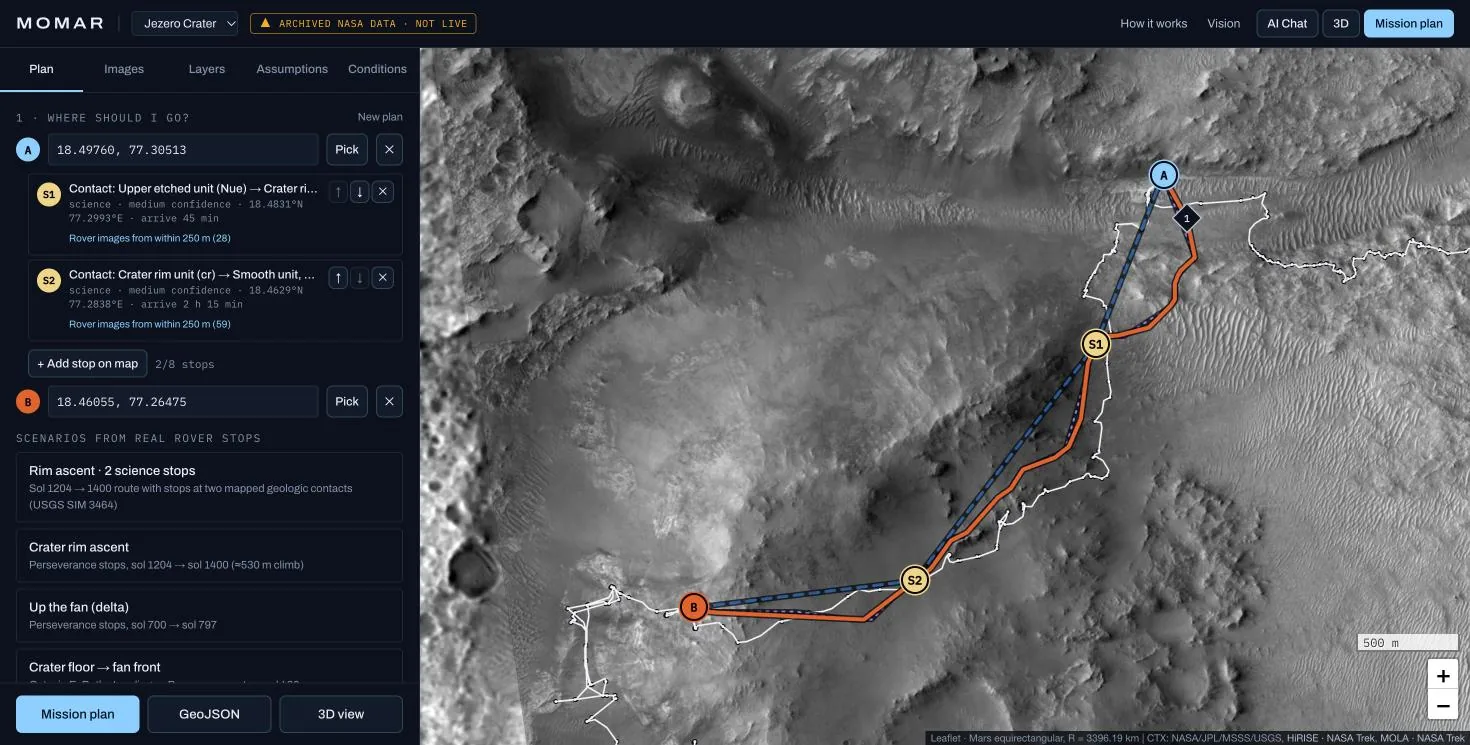
MOMAR planner: CTX imagery of the Jezero crater rim with a blue dashed shortest route and an orange lower-risk route through two science stops.
Shortest (blue, dashed) and lower-risk (orange) routes up the Jezero rim, through two mapped geologic contacts.
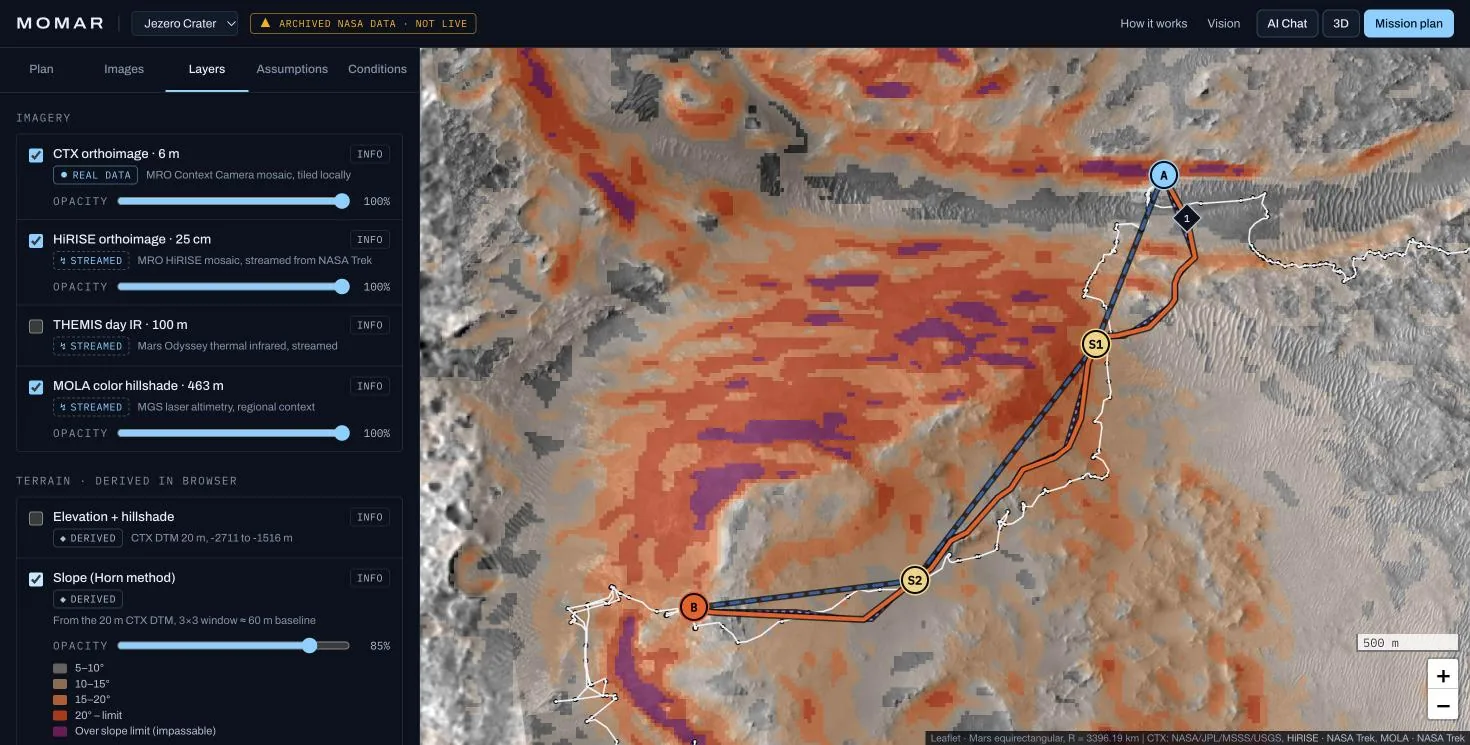
MOMAR layer panel with a slope layer derived from the CTX DTM draped over imagery, classes from 5° to over the slope limit.
Slope derived in the browser from the 20 m CTX DTM, with its legend and provenance.
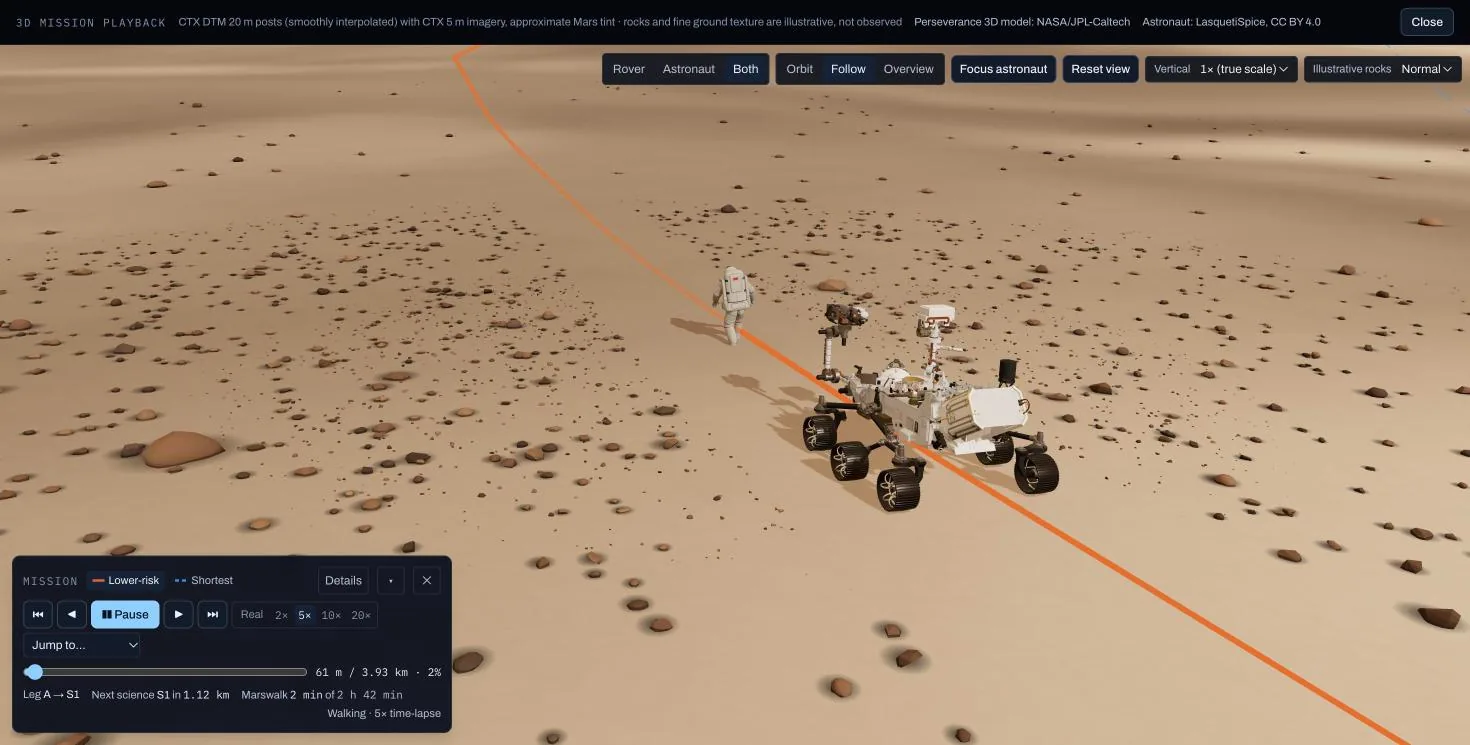
MOMAR 3-D playback: NASA's Perseverance model and an animated astronaut following the planned route over Martian terrain.
3-D playback. Rocks and fine ground texture are illustrative and are not used by the planner.
03Moon · mission contextPlanned

CLPS Lunar Mission Browser

A planned browser-based platform for exploring lunar mission information, terrain and scientific context relevant to NASA's Commercial Lunar Payload Services (CLPS) deliveries.

Purpose

Bring the scattered public context around commercial lunar deliveries — where, what terrain, what data — into one research-oriented view, with sources attached to every value.

Through CLPS, NASA purchases delivery of science and technology payloads to the Moon from commercial companies. This browser is not an official NASA tool and is not intended to support operational mission decisions.

Intended users

  • Lunar-science students and researchers
  • Engineers studying lunar surface operations
  • Science communicators following commercial lunar missions

Intended workflow

  1. 01Select a mission or a lunar region.
  2. 02Inspect surface imagery and elevation for that region.
  3. 03Explore terrain features and environmental constraints that the available data supports.
  4. 04Compare regions only where comparable measurements exist.
  5. 05View sources, metadata and analysis results for every layer.
  6. 06Use research-oriented visualizations to understand the mission's setting.

Capabilities

  • A rotating lunar globe from NASA SVS's LROC WAC colour and LOLA elevation products (visual context only)Available
  • Lunar elevation and slope pipeline from LOLA productsPlanned
  • Mission and landing-region catalogue sourced from official mission pagesPlanned
  • Illumination and shadow analysis where suitable products existPlanned

Limitations

  • Not built yet. Data access, licensing, coverage and resolution are being evaluated before anything is integrated.

04 / Future research

Research areas on the roadmap.

These are directions, not products. Each is labelled with how far it has actually progressed.

Research

Autonomous rover navigation

Global path planning on orbital elevation models is the first layer and already runs in MOMAR and the Terrain Lab. Next: any-angle planning, uncertainty-aware costs and replanning as new terrain data arrives.

Planned

Planetary digital twins

Persistent, versioned models of a site that combine terrain, imagery, illumination and mission state, so scenarios can be replayed and compared.

Planned

Multi-sensor terrain perception

Fusing stereo imagery, lidar and thermal data to classify terrain at rover scale, beyond what orbital data resolves.

Planned

Robotic exploration simulation

Physics-based simulation of rovers on reconstructed terrain, to test navigation software before any hardware exists.

Planned

Space robotics software and hardware interfaces

Interfaces that connect planning software and simulators to robotic platforms, and research into embedded and onboard computing — pursued only as engineering progress supports it.